Start with one record that someone types twice. Trace where it begins, what the next system needs, and who notices if the transfer fails. An integration is a good first step when both tools do their jobs well and moving information between them causes most of the trouble.
Give each part of the record an owner
A customer relationship tool might own the customer’s contact details. An accounting platform might own the invoice number and payment status. A scheduling tool might own the appointment. Agree on which product can make changes to each field, and record where everyone else can read the value. That choice gives the team a way to resolve disagreements.
Use stable identifiers to map records. A customer’s name can change. Two people can have the same name. Maintain a mapping between source and destination IDs and review uncertain matches before you join them.
For a first release, choose one direction and one trigger. For example, an accepted estimate creates a job in scheduling. Let the team edit the estimate in its original system and the appointment in the calendar. Write down who handles a cancellation or a revised estimate. Those are real requirements even if they occur less often.
Choose a delivery method the team can support
| Method | Good fit | Question to answer |
|---|---|---|
| Scheduled file transfer | Low volume, predictable batches and a usable export | Who catches a missing or rejected file? |
| API polling | The source has an API and updates can wait for a scheduled check | How will you resume from a known point after a failure? |
| Webhooks | A product can notify you when something changes | How will you handle duplicate, delayed or out-of-order events? |
| Native connector | The vendor’s connector covers the required fields and exceptions | Can the team inspect, replay and reconcile the records it moves? |
Read the documentation for each product before choosing the pattern. Stripe, for example, documents webhook retries and delivery that may occur out of order. A receiver that supports retries should recognize a delivery it has already processed so it can avoid creating a second job or invoice. Stripe webhook delivery documentation
Design the failure path before the rollout
A useful integration records the source ID, destination ID, time and status. A failed transfer should appear in a place someone owns. Give that person enough context to act while keeping customer data out of routine alerts. Define what can retry automatically, what requires human review and what should pause the workflow.
When a system must commit a record and send an event reliably, a transactional outbox is one pattern to evaluate. It stores the change and the pending message together before a separate process sends it. Consumers may still receive duplicates and need to handle them safely. Smaller integrations can begin with a durable retry queue or a reconciliation report where the risk and volume allow it. AWS guidance on the transactional outbox
Worked example: recover a lost acknowledgement
An accepted estimate in the source system should create one scheduling job. The source owns estimate revision 3. The scheduler owns the appointment. The integration stores a delivery record keyed by the source estimate ID and approved revision. The scheduler must support that key through an idempotent create or an enforced unique external reference before the pilot.
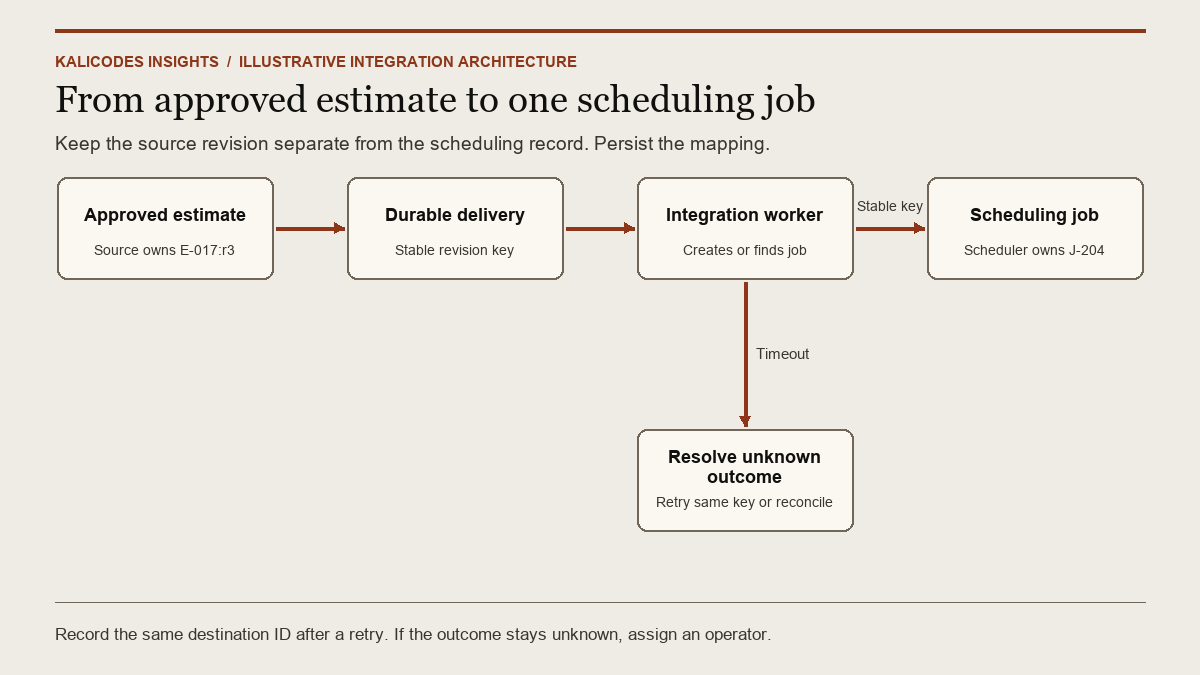
- Estimate E-017 revision 3 is approved. The delivery record moves to queued with external reference E-017:r3.
- The scheduler creates job J-204, but the request times out before the integration receives the response. The delivery record shows an unknown outcome. The integration leaves the source approval as it was.
- The worker retries with the same key, or checks the unique external reference first. It finds J-204 and records the mapping. A second delivery of the same revision resolves to the same job.
- The reconciliation view shows one approved estimate and one corresponding scheduling job. If the scheduler cannot prove whether the job exists, route the item to an operator and show what to verify before replaying it.
A later approved revision requires a distinct business rule, for example amending the linked job after review. A revision key by itself does not decide whether to amend a job or create a new one. Include that case in the pilot. Use the integration pilot checklist
Pilot one handoff
Run a small pilot with redacted or test records where possible. Compare source and destination counts, check required fields and rehearse a duplicate delivery, a rejected record and a temporary outage. Establish a pause procedure and record how to replay missing work before you remove the manual step.
Track two measures at first. Count the records that arrive correctly and the ones someone must fix. If the remaining failures come from a tool’s own workflow, you now have evidence for a product change or a dedicated system. Read the workflow automation guide · Discuss a Business Systems project
Practical resource
Integration pilot checklist
Choose one source, trigger and destination. Agree on expected evidence for duplicates, timeouts and rejection before retiring a manual process.
Worked example · hypothetical
When E-017 revision 3 is approved, the integration uses E-017:r3 as the external key. If the acknowledgement is lost, reconciliation finds J-204 before anyone creates another job.
Reference notes
| Situation | Expected evidence |
|---|---|
| Valid approval | One destination job with the correct source and revision mapping. |
| Duplicate delivery | No second job. Existing mapping returned or recorded. |
| Timeout after remote creation | Unknown outcome is visible. Same key returns the existing job or reconciliation locates it. |
| Rejected data | Failure state explains the field and names the operator. No blind retry loop. |
| Source revises approved estimate | Documented amendment or decision path applies. The original decision can still be traced. |
| Temporary outage | Unresolved work stays visible. Queue or manual process resumes from the last known state. |
Test with fictional or redacted records. Keep a pause and reconciliation step before removing the original manual handoff.
Blank worksheet
Fill in a copy in this browser or print a blank sheet. Entries stay on this page. Use business references in the notes.
| Prompt | Your notes |
|---|---|