A business has outgrown a spreadsheet when keeping the file accurate has become part of everyone’s job. Someone reconciles versions before a meeting. A request gets approved in chat, then copied into a row. The next person sees a date and an initial, without enough context to act. Those are signs that the team needs a clearer way to run the work.
Spreadsheets can handle shared editing. Excel, for example, supports co-authoring in compatible versions when the workbook is stored in a supported cloud location. If the only issue is people emailing attachments back and forth, one shared workbook may solve it. Begin with the smallest change that removes the failure. Microsoft Excel co-authoring
Look at the handoff
Follow a recent request that went well and one that needed chasing. Write down who created the record, what each person needed, and where the decision was made. The difference between the two tells you more than a list of every tab in the workbook.
Three signs make a stronger case for changing the workflow.
- The next owner is unclear. A row says “in progress” while two teams wait for each other. Someone has to ask who acts next.
- A decision lives outside the record. Approval sits in an inbox while the spreadsheet shows a number that can still change. The team cannot easily tell which scope was approved.
- Every report starts with reconciliation. Two sources use different names for the same item. Someone has to correct the data before anyone can use it.
A modest volume of high-consequence exceptions can justify better controls sooner than a large volume of easily reversible work. Count what matters to your team. Useful starting measures include minutes spent re-entering a record, age of the oldest open item and how often an approval needs to be checked again.
Decide what should own the work
| What you observe | A reasonable next step |
|---|---|
| One team, stable columns and straightforward access | Use a shared workbook, define its owner and standardize the input. |
| A good product already covers the work | Configure its workflow and use it as the source for the relevant records. |
| Two reliable systems keep asking people to re-enter the same details | Connect the systems and assign one owner for each field that moves. |
| The process needs distinct roles, approvals, exceptions and history | Trial one dedicated workflow with clear states and a record of decisions. |
For a dedicated workflow, agree on the first record and the smallest useful set of states. An equipment repair might move through intake, diagnosis, estimate, approval, repair and collection. A decision should reference the estimate version the customer saw. If the scope changes, raise a new decision for the revised estimate. The BENCH working concept illustrates this repair flow with fictional records.
Run a spreadsheet replacement assessment
Review the last ten completed records and the open items from one representative week. Use the same sample for both the quick fix and any replacement pilot. Record four things for each row.
| Check | Evidence to capture |
|---|---|
| Ownership | Can someone identify the next owner without asking? |
| Decision | Can they show the exact value, version or scope that was approved? |
| Re-entry | Which fields are copied, how often and into which tool? |
| Exceptions | Can the team find late, rejected or revised requests and resume them? |
Use the consequence of the failure to choose the next action. Losing an approval for expensive work matters even if it happens rarely. If a shared file with an owner and consistent fields solves the sampled failures, pilot that first. If a single transfer accounts for most re-entry and both tools suit the work, test an integration. If the sample exposes role boundaries, versioned decisions and unresolved exceptions, pilot a dedicated workflow.
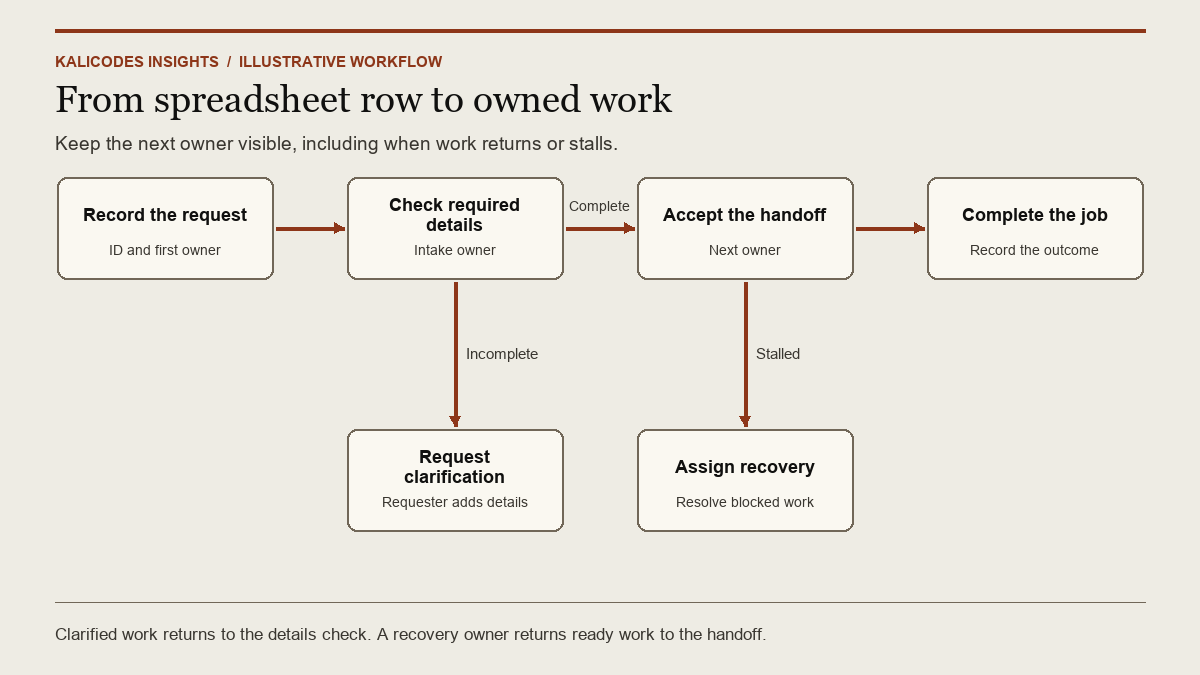
A proposed workflow has an owner and a state at intake. Missing details return to the requester. Once the request is complete, the next owner accepts the handoff. A stalled item gets a named recovery owner before the job closes. Use the same sequence to review a shared workbook, configured tool or dedicated system.
Move one workflow first
Pick a recent representative slice of data and decide how you will identify duplicates. Walk the draft process with the people who run it, including whoever handles exceptions. Test a missing required detail, a job waiting for parts and a revised approval. Compare counts and status totals before giving the new workflow responsibility for open work.
Leave reports and one-off analysis in spreadsheets where that still suits the team. Set a date when the new workflow becomes the place to update the live record. Keep access to the old data during the transition so the team can reconcile what moved and recover if the cutover fails.
Before switching the live record
- Name the source of truth and the person authorized to change it.
- Reconcile the pilot sample by ID, state and approval version.
- Demonstrate a rejected or revised request and a delayed handoff.
- Agree who can pause the cutover and where work resumes if it fails.
- Compare chasing time, missing owners or unresolved approvals with the starting sample before expanding the rollout.
Use the spreadsheet replacement worksheet for a printable version.
If one handoff keeps consuming time, bring a redacted example and the people involved. Start with that slice of work. Explore Business Systems · Discuss a workflow
Try the Business Workflow Assessment · Estimate the value of replacing one repeated step
Practical resource
Spreadsheet replacement worksheet
Choose one recurring handoff. Record where it slows down, then compare a smaller change with a replacement.
Worked example · hypothetical
An estimate needs a second-shift approval. The outgoing owner hands over a named request and due time. The incoming owner confirms that the request is visible.
Reference notes
Choose one workflow and review ten complete records plus open work from a representative week. Use redacted identifiers. Compare the same types of records after the pilot.
- Name the person who can fix the highest-consequence failure.
- Try improved shared-file controls, product configuration or one integration when it fits the failure. Define role and history requirements when considering a dedicated system.
- Agree on the pilot workflow and the two changes you want to observe. Record their starting values and denominators.
- Reconcile ID, state and approval version. Rehearse a delayed item, a revised approval and a rollback.
- Record the new source of truth, owner and cutover date. Check the same measures before expanding.
Blank worksheet
Fill in a copy in this browser or print a blank sheet. Entries stay on this page. Use business references in the notes.
| Prompt | Your notes |
|---|---|